Sprite Rotation Around a Tank#
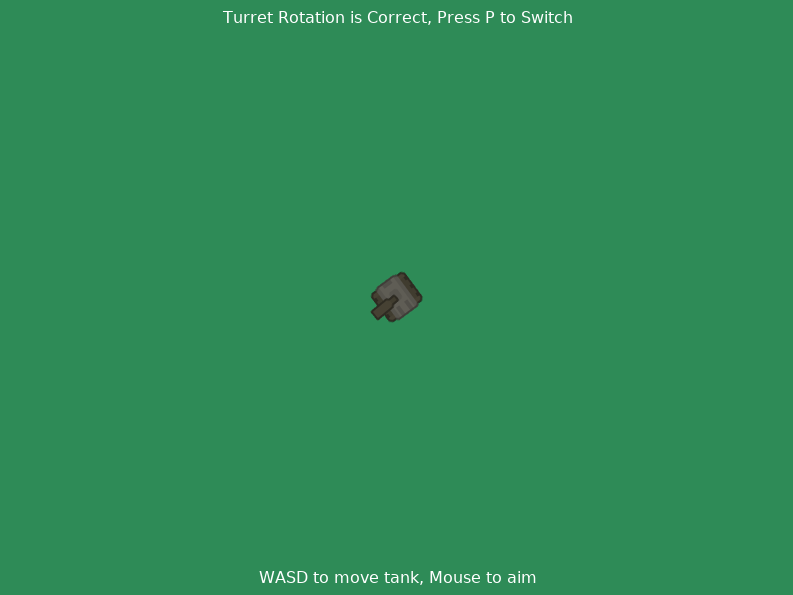
This example uses a player-controlled tank to demonstrate the difference between the right and wrong way of rotating a turret around an attachment point. In both modes, the tank’s barrel follows the mouse. The turret sprite is ommitted to keep the rotation visible.
See the docstring, comments, and on screen instructions for further info.
sprite_rotation_around_tank.py#
  1"""
  2Sprite Rotation Around a Point, With A Tank
  3
  4Games often include elements that rotate toward targets. Common
  5examples include gun turrets on vehicles and towers. In 2D games,
  6these rotating parts are usually implemented as sprites that move
  7relative to whatever they're attached to.
  8
  9There's a catch to this: you have to rotate these parts around their
 10attachment points rather than the centers of their sprites. Otherwise,
 11the rotation will look wrong!
 12
 13To illustrate the difference, this example uses a player-controllable
 14tank with a barrel that follows the mouse. You can press P to switch
 15between two ways of rotating the barrel:
 161. Correctly, with the barrel's rear against the tank's center
 172. Incorrectly, around the barrel's center pinned to the tank's
 18
 19Artwork from https://kenney.nl
 20
 21If Python and Arcade are installed, this example can be run from the command line with:
 22python -m arcade.examples.sprite_rotate_around_tank
 23"""
 24import arcade
 25import math
 26
 27
 28TANK_SPEED_PIXELS = 64  # How many pixels per second the tank travels
 29TANK_TURN_SPEED_DEGREES = 70  # How fast the tank's body can turn
 30
 31
 32# This is half the length of the barrel sprite.
 33# We use it to ensure the barrel's rear sits in the middle of the tank
 34TANK_BARREL_LENGTH_HALF = 15
 35
 36
 37SCREEN_WIDTH = 800
 38SCREEN_HEIGHT = 600
 39SCREEN_MIDDLE = (SCREEN_WIDTH // 2, SCREEN_HEIGHT // 2)
 40
 41
 42SCREEN_TITLE = "Rotating Tank Example"
 43
 44
 45# These paths are built-in resources included with arcade
 46TANK_BODY = ":resources:images/topdown_tanks/tankBody_dark_outline.png"
 47TANK_BARREL = ":resources:images/topdown_tanks/tankDark_barrel3_outline.png"
 48
 49
 50class RotatingSprite(arcade.Sprite):
 51    """
 52    Sprite subclass which can be rotated around a point.
 53
 54    This version of the class always changes the angle of the sprite.
 55    Other games might not rotate the sprite. For example, moving
 56    platforms in a platformer wouldn't rotate.
 57    """
 58    def rotate_around_point(self, point: arcade.Point, degrees: float):
 59        """
 60        Rotate the sprite around a point by the set amount of degrees
 61
 62        :param point: The point that the sprite will rotate about
 63        :param degrees: How many degrees to rotate the sprite
 64        """
 65
 66        # Make the sprite turn as its position is moved
 67        self.angle += degrees
 68
 69        # Move the sprite along a circle centered around the passed point
 70        self.position = arcade.rotate_point(
 71            self.center_x, self.center_y,
 72            point[0], point[1], degrees)
 73
 74
 75class ExampleWindow(arcade.Window):
 76
 77    def __init__(self):
 78        super().__init__(SCREEN_WIDTH, SCREEN_HEIGHT, SCREEN_TITLE)
 79
 80        # Set Background to be green
 81        self.background_color = arcade.csscolor.SEA_GREEN
 82
 83        # The tank and barrel sprite
 84        self.tank = arcade.Sprite(TANK_BODY)
 85        self.tank.position = SCREEN_MIDDLE
 86
 87        self.barrel = RotatingSprite(TANK_BARREL)
 88        self.barrel.position =\
 89            SCREEN_MIDDLE[0], SCREEN_MIDDLE[1] - TANK_BARREL_LENGTH_HALF
 90
 91        self.tank_direction = 0.0  # Forward & backward throttle
 92        self.tank_turning = 0.0  # Turning strength to the left or right
 93
 94        self.mouse_pos = 0, 0
 95
 96        self.tank_sprite_list = arcade.SpriteList()
 97        self.tank_sprite_list.extend([self.tank, self.barrel])
 98
 99        self._correct = True
100        self.correct_text = arcade.Text(
101            "Turret Rotation is Correct, Press P to Switch",
102            SCREEN_MIDDLE[0], SCREEN_HEIGHT - 25,
103            anchor_x='center')
104
105        self.control_text = arcade.Text(
106            "WASD to move tank, Mouse to aim",
107            SCREEN_MIDDLE[0], 15,
108            anchor_x='center')
109
110    def on_draw(self):
111        self.clear()
112        self.tank_sprite_list.draw()
113
114        self.control_text.draw()
115        self.correct_text.draw()
116
117    def on_update(self, delta_time: float):
118        self.move_tank(delta_time)
119
120    def move_tank(self, delta_time):
121        """
122        Perform all calculations for moving the tank's body and barrel
123        """
124
125        # Rotate the tank's body in place without changing position
126        # We'll rotate the barrel after updating the entire tank's x & y
127        self.tank.angle += TANK_TURN_SPEED_DEGREES\
128            * self.tank_turning * delta_time
129
130        # Calculate how much the tank should move forward or back
131        move_magnitude = self.tank_direction * TANK_SPEED_PIXELS * delta_time
132        x_dir = math.cos(self.tank.radians - math.pi / 2) * move_magnitude
133        y_dir = math.sin(self.tank.radians - math.pi / 2) * move_magnitude
134
135        # Move the tank's body
136        self.tank.position =\
137            self.tank.center_x + x_dir,\
138            self.tank.center_y + y_dir
139
140        # Move the barrel with the body
141        self.barrel.position =\
142            self.barrel.center_x + x_dir,\
143            self.barrel.center_y + y_dir
144
145        # Begin rotating the barrel by finding the angle to the mouse
146        mouse_angle = arcade.get_angle_degrees(
147            self.tank.center_y, self.tank.center_x,
148            self.mouse_pos[1], self.mouse_pos[0])
149
150        # Compensate for the vertical orientation of the barrel texture
151        # This could be skipped if the texture faced right instead
152        mouse_angle += 90
153
154        if self.correct:
155            # Rotate the barrel sprite with one end at the tank's center
156
157            # Subtract the old angle to get the change in angle
158            angle_change = mouse_angle - self.barrel.angle
159
160            self.barrel.rotate_around_point(self.tank.position, angle_change)
161        else:
162            # Swivel the barrel with its center aligned with the body's
163            self.barrel.angle = mouse_angle
164
165    def on_key_press(self, symbol: int, modifiers: int):
166        if symbol == arcade.key.W:
167            self.tank_direction += 1
168        elif symbol == arcade.key.S:
169            self.tank_direction -= 1
170        elif symbol == arcade.key.A:
171            self.tank_turning += 1
172        elif symbol == arcade.key.D:
173            self.tank_turning -= 1
174        elif symbol == arcade.key.P:
175            self.correct = not self.correct
176
177            self.correct_text.text =\
178                f"Turret Rotation is "\
179                f"{'Correct' if self.correct else 'Incorrect'},"\
180                f" Press P to Switch"
181
182    def on_key_release(self, symbol: int, modifiers: int):
183        if symbol == arcade.key.W:
184            self.tank_direction -= 1
185        elif symbol == arcade.key.S:
186            self.tank_direction += 1
187        elif symbol == arcade.key.A:
188            self.tank_turning -= 1
189        elif symbol == arcade.key.D:
190            self.tank_turning += 1
191
192    def on_mouse_motion(self, x: int, y: int, dx: int, dy: int):
193        self.mouse_pos = x, y
194
195    @property
196    def correct(self):
197        return self._correct
198
199    @correct.setter
200    def correct(self, correct: bool):
201        """
202        Move the tank's barrel between correct rotation and incorrect positions
203        """
204        self._correct = correct
205        if correct:
206            angle = arcade.get_angle_radians(
207                self.tank.center_y, self.tank.center_x,
208                self.mouse_pos[1], self.mouse_pos[0])
209
210            self.barrel.position =\
211                self.barrel.center_x + math.cos(angle) * TANK_BARREL_LENGTH_HALF,\
212                self.barrel.center_y + math.sin(angle) * TANK_BARREL_LENGTH_HALF
213
214        else:
215            self.barrel.position = self.tank.position
216
217
218def main():
219    window = ExampleWindow()
220    window.run()
221
222
223if __name__ == '__main__':
224    main()