Moving Between Different Rooms#
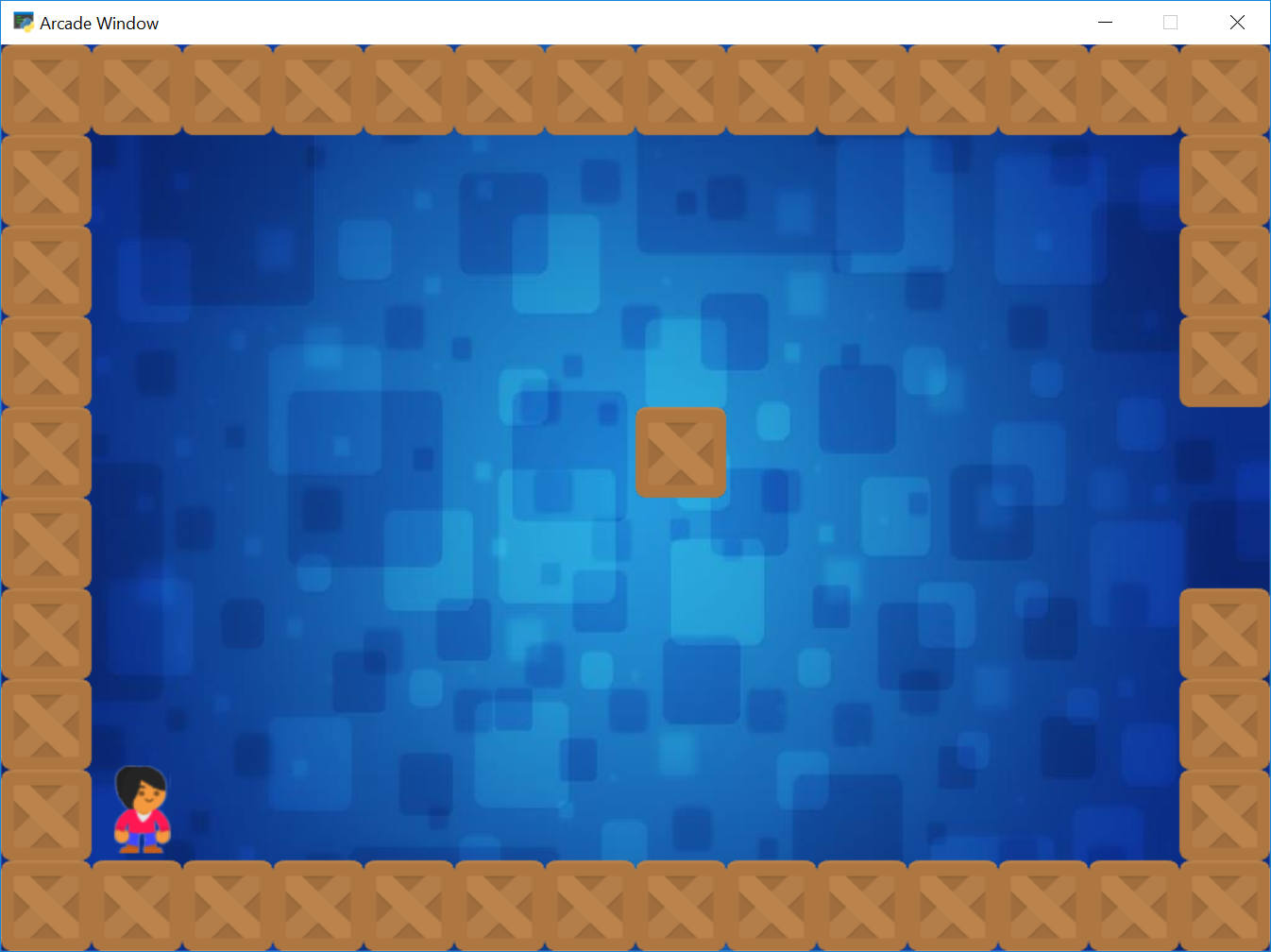
sprite_rooms.py#
  1"""
  2Sprite move between different rooms.
  3
  4Artwork from https://kenney.nl
  5
  6If Python and Arcade are installed, this example can be run from the command line with:
  7python -m arcade.examples.sprite_rooms
  8"""
  9import arcade
 10
 11SPRITE_SCALING = 0.5
 12SPRITE_NATIVE_SIZE = 128
 13SPRITE_SIZE = int(SPRITE_NATIVE_SIZE * SPRITE_SCALING)
 14
 15SCREEN_WIDTH = SPRITE_SIZE * 14
 16SCREEN_HEIGHT = SPRITE_SIZE * 10
 17SCREEN_TITLE = "Sprite Rooms Example"
 18
 19MOVEMENT_SPEED = 5
 20
 21
 22class Room:
 23    """
 24    This class holds all the information about the
 25    different rooms.
 26    """
 27    def __init__(self):
 28        # You may want many lists. Lists for coins, monsters, etc.
 29        self.wall_list = None
 30
 31        # This holds the background images. If you don't want changing
 32        # background images, you can delete this part.
 33        self.background = None
 34
 35
 36def setup_room_1():
 37    """
 38    Create and return room 1.
 39    If your program gets large, you may want to separate this into different
 40    files.
 41    """
 42    room = Room()
 43
 44    """ Set up the game and initialize the variables. """
 45    # Sprite lists
 46    room.wall_list = arcade.SpriteList()
 47
 48    # -- Set up the walls
 49    # Create bottom and top row of boxes
 50    # This y loops a list of two, the coordinate 0, and just under the top of window
 51    for y in (0, SCREEN_HEIGHT - SPRITE_SIZE):
 52        # Loop for each box going across
 53        for x in range(0, SCREEN_WIDTH, SPRITE_SIZE):
 54            wall = arcade.Sprite(":resources:images/tiles/boxCrate_double.png",
 55                                 SPRITE_SCALING)
 56            wall.left = x
 57            wall.bottom = y
 58            room.wall_list.append(wall)
 59
 60    # Create left and right column of boxes
 61    for x in (0, SCREEN_WIDTH - SPRITE_SIZE):
 62        # Loop for each box going across
 63        for y in range(SPRITE_SIZE, SCREEN_HEIGHT - SPRITE_SIZE, SPRITE_SIZE):
 64            # Skip making a block 4 and 5 blocks up on the right side
 65            if (y != SPRITE_SIZE * 4 and y != SPRITE_SIZE * 5) or x == 0:
 66                wall = arcade.Sprite(":resources:images/tiles/boxCrate_double.png",
 67                                     SPRITE_SCALING)
 68                wall.left = x
 69                wall.bottom = y
 70                room.wall_list.append(wall)
 71
 72    wall = arcade.Sprite(":resources:images/tiles/boxCrate_double.png",
 73                         SPRITE_SCALING)
 74    wall.left = 7 * SPRITE_SIZE
 75    wall.bottom = 5 * SPRITE_SIZE
 76    room.wall_list.append(wall)
 77
 78    # If you want coins or monsters in a level, then add that code here.
 79
 80    # Load the background image for this level.
 81    room.background = arcade.load_texture(":resources:images/backgrounds/"
 82                                          "abstract_1.jpg")
 83
 84    return room
 85
 86
 87def setup_room_2():
 88    """
 89    Create and return room 2.
 90    """
 91    room = Room()
 92
 93    """ Set up the game and initialize the variables. """
 94    # Sprite lists
 95    room.wall_list = arcade.SpriteList()
 96
 97    # -- Set up the walls
 98    # Create bottom and top row of boxes
 99    # This y loops a list of two, the coordinate 0, and just under the top of window
100    for y in (0, SCREEN_HEIGHT - SPRITE_SIZE):
101        # Loop for each box going across
102        for x in range(0, SCREEN_WIDTH, SPRITE_SIZE):
103            wall = arcade.Sprite(":resources:images/tiles/boxCrate_double.png", SPRITE_SCALING)
104            wall.left = x
105            wall.bottom = y
106            room.wall_list.append(wall)
107
108    # Create left and right column of boxes
109    for x in (0, SCREEN_WIDTH - SPRITE_SIZE):
110        # Loop for each box going across
111        for y in range(SPRITE_SIZE, SCREEN_HEIGHT - SPRITE_SIZE, SPRITE_SIZE):
112            # Skip making a block 4 and 5 blocks up
113            if (y != SPRITE_SIZE * 4 and y != SPRITE_SIZE * 5) or x != 0:
114                wall = arcade.Sprite(":resources:images/tiles/boxCrate_double.png", SPRITE_SCALING)
115                wall.left = x
116                wall.bottom = y
117                room.wall_list.append(wall)
118
119    wall = arcade.Sprite(":resources:images/tiles/boxCrate_double.png", SPRITE_SCALING)
120    wall.left = 5 * SPRITE_SIZE
121    wall.bottom = 6 * SPRITE_SIZE
122    room.wall_list.append(wall)
123    room.background = arcade.load_texture(":resources:images/backgrounds/abstract_2.jpg")
124
125    return room
126
127
128class MyGame(arcade.Window):
129    """ Main application class. """
130
131    def __init__(self, width, height, title):
132        """
133        Initializer
134        """
135        super().__init__(width, height, title)
136
137        # Sprite lists
138        self.current_room = 0
139
140        # Set up the player
141        self.rooms = None
142        self.player_sprite = None
143        self.player_list = None
144        self.physics_engine = None
145
146    def setup(self):
147        """ Set up the game and initialize the variables. """
148        # Set up the player
149        self.player_sprite = arcade.Sprite(":resources:images/animated_characters/female_person/"
150                                           "femalePerson_idle.png", SPRITE_SCALING)
151        self.player_sprite.center_x = 100
152        self.player_sprite.center_y = 100
153        self.player_list = arcade.SpriteList()
154        self.player_list.append(self.player_sprite)
155
156        # Our list of rooms
157        self.rooms = []
158
159        # Create the rooms. Extend the pattern for each room.
160        room = setup_room_1()
161        self.rooms.append(room)
162
163        room = setup_room_2()
164        self.rooms.append(room)
165
166        # Our starting room number
167        self.current_room = 0
168
169        # Create a physics engine for this room
170        self.physics_engine = arcade.PhysicsEngineSimple(self.player_sprite,
171                                                         self.rooms[self.current_room].wall_list)
172
173    def on_draw(self):
174        """
175        Render the screen.
176        """
177
178        # This command has to happen before we start drawing
179        self.clear()
180
181        # Draw the background texture
182        arcade.draw_lrwh_rectangle_textured(0, 0,
183                                            SCREEN_WIDTH, SCREEN_HEIGHT,
184                                            self.rooms[self.current_room].background)
185
186        # Draw all the walls in this room
187        self.rooms[self.current_room].wall_list.draw()
188
189        # If you have coins or monsters, then copy and modify the line
190        # above for each list.
191
192        self.player_list.draw()
193
194    def on_key_press(self, key, modifiers):
195        """Called whenever a key is pressed. """
196
197        if key == arcade.key.UP:
198            self.player_sprite.change_y = MOVEMENT_SPEED
199        elif key == arcade.key.DOWN:
200            self.player_sprite.change_y = -MOVEMENT_SPEED
201        elif key == arcade.key.LEFT:
202            self.player_sprite.change_x = -MOVEMENT_SPEED
203        elif key == arcade.key.RIGHT:
204            self.player_sprite.change_x = MOVEMENT_SPEED
205
206    def on_key_release(self, key, modifiers):
207        """Called when the user releases a key. """
208
209        if key == arcade.key.UP or key == arcade.key.DOWN:
210            self.player_sprite.change_y = 0
211        elif key == arcade.key.LEFT or key == arcade.key.RIGHT:
212            self.player_sprite.change_x = 0
213
214    def on_update(self, delta_time):
215        """ Movement and game logic """
216
217        # Call update on all sprites (The sprites don't do much in this
218        # example though.)
219        self.physics_engine.update()
220
221        # Do some logic here to figure out what room we are in, and if we need to go
222        # to a different room.
223        if self.player_sprite.center_x > SCREEN_WIDTH and self.current_room == 0:
224            self.current_room = 1
225            self.physics_engine = arcade.PhysicsEngineSimple(self.player_sprite,
226                                                             self.rooms[self.current_room].wall_list)
227            self.player_sprite.center_x = 0
228        elif self.player_sprite.center_x < 0 and self.current_room == 1:
229            self.current_room = 0
230            self.physics_engine = arcade.PhysicsEngineSimple(self.player_sprite,
231                                                             self.rooms[self.current_room].wall_list)
232            self.player_sprite.center_x = SCREEN_WIDTH
233
234
235def main():
236    """ Main function """
237    window = MyGame(SCREEN_WIDTH, SCREEN_HEIGHT, SCREEN_TITLE)
238    window.setup()
239    arcade.run()
240
241
242if __name__ == "__main__":
243    main()