Aim and Shoot Bullets#
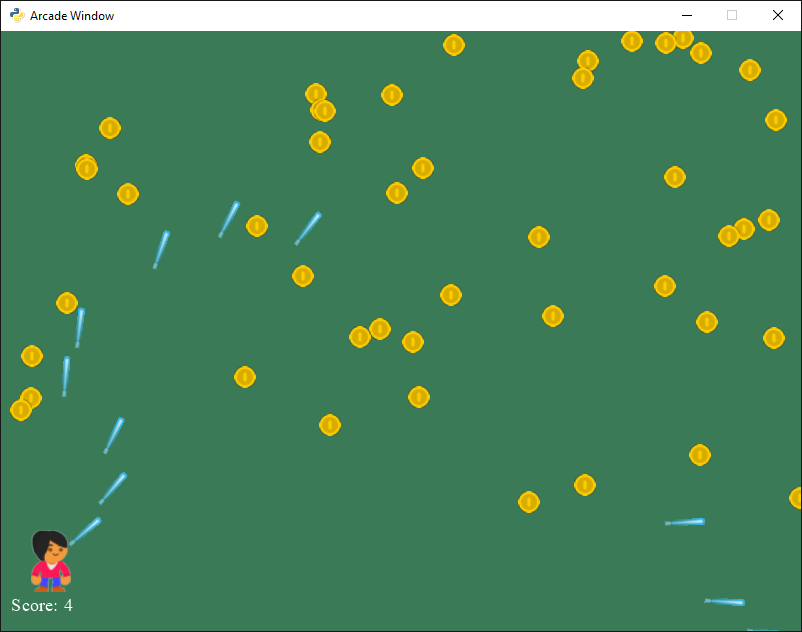
sprite_bullets_aimed.py#
  1"""
  2Sprite Bullets
  3
  4Simple program to show basic sprite usage.
  5
  6Artwork from https://kenney.nl
  7
  8If Python and Arcade are installed, this example can be run from the command line with:
  9python -m arcade.examples.sprite_bullets_aimed
 10"""
 11
 12import random
 13import arcade
 14import math
 15
 16SPRITE_SCALING_PLAYER = 0.5
 17SPRITE_SCALING_COIN = 0.2
 18SPRITE_SCALING_LASER = 0.8
 19COIN_COUNT = 50
 20
 21SCREEN_WIDTH = 800
 22SCREEN_HEIGHT = 600
 23SCREEN_TITLE = "Sprites and Bullets Aimed Example"
 24
 25BULLET_SPEED = 5
 26
 27window = None
 28
 29
 30class MyGame(arcade.Window):
 31    """ Main application class. """
 32
 33    def __init__(self):
 34        """ Initializer """
 35        # Call the parent class initializer
 36        super().__init__(SCREEN_WIDTH, SCREEN_HEIGHT, SCREEN_TITLE)
 37
 38        # Variables that will hold sprite lists
 39        self.player_list = None
 40        self.coin_list = None
 41        self.bullet_list = None
 42
 43        # Set up the player info
 44        self.player_sprite = None
 45        self.score = 0
 46        self.score_text = None
 47
 48        # Load sounds. Sounds from kenney.nl
 49        self.gun_sound = arcade.sound.load_sound(":resources:sounds/laser1.wav")
 50        self.hit_sound = arcade.sound.load_sound(":resources:sounds/phaseJump1.wav")
 51
 52        arcade.set_background_color(arcade.color.AMAZON)
 53
 54    def setup(self):
 55
 56        """ Set up the game and initialize the variables. """
 57
 58        # Sprite lists
 59        self.player_list = arcade.SpriteList()
 60        self.coin_list = arcade.SpriteList()
 61        self.bullet_list = arcade.SpriteList()
 62
 63        # Set up the player
 64        self.score = 0
 65
 66        # Image from kenney.nl
 67        self.player_sprite = arcade.Sprite(":resources:images/animated_characters/female_person/"
 68                                           "femalePerson_idle.png", SPRITE_SCALING_PLAYER)
 69        self.player_sprite.center_x = 50
 70        self.player_sprite.center_y = 70
 71        self.player_list.append(self.player_sprite)
 72
 73        # Create the coins
 74        for i in range(COIN_COUNT):
 75
 76            # Create the coin instance
 77            # Coin image from kenney.nl
 78            coin = arcade.Sprite(":resources:images/items/coinGold.png", SPRITE_SCALING_COIN)
 79
 80            # Position the coin
 81            coin.center_x = random.randrange(SCREEN_WIDTH)
 82            coin.center_y = random.randrange(120, SCREEN_HEIGHT)
 83
 84            # Add the coin to the lists
 85            self.coin_list.append(coin)
 86
 87        # Set the background color
 88        arcade.set_background_color(arcade.color.AMAZON)
 89
 90    def on_draw(self):
 91        """ Render the screen. """
 92
 93        # This command has to happen before we start drawing
 94        self.clear()
 95
 96        # Draw all the sprites.
 97        self.coin_list.draw()
 98        self.bullet_list.draw()
 99        self.player_list.draw()
100
101        # Put the text on the screen.
102        output = f"Score: {self.score}"
103        arcade.draw_text(output, 10, 20, arcade.color.WHITE, 14)
104
105    def on_mouse_press(self, x, y, button, modifiers):
106        """ Called whenever the mouse button is clicked. """
107
108        # Create a bullet
109        bullet = arcade.Sprite(":resources:images/space_shooter/laserBlue01.png", SPRITE_SCALING_LASER)
110
111        # Position the bullet at the player's current location
112        start_x = self.player_sprite.center_x
113        start_y = self.player_sprite.center_y
114        bullet.center_x = start_x
115        bullet.center_y = start_y
116
117        # Get from the mouse the destination location for the bullet
118        # IMPORTANT! If you have a scrolling screen, you will also need
119        # to add in self.view_bottom and self.view_left.
120        dest_x = x
121        dest_y = y
122
123        # Do math to calculate how to get the bullet to the destination.
124        # Calculation the angle in radians between the start points
125        # and end points. This is the angle the bullet will travel.
126        x_diff = dest_x - start_x
127        y_diff = dest_y - start_y
128        angle = math.atan2(y_diff, x_diff)
129
130        # Angle the bullet sprite so it doesn't look like it is flying
131        # sideways.
132        bullet.angle = math.degrees(angle)
133        print(f"Bullet angle: {bullet.angle:.2f}")
134
135        # Taking into account the angle, calculate our change_x
136        # and change_y. Velocity is how fast the bullet travels.
137        bullet.change_x = math.cos(angle) * BULLET_SPEED
138        bullet.change_y = math.sin(angle) * BULLET_SPEED
139
140        # Add the bullet to the appropriate lists
141        self.bullet_list.append(bullet)
142
143    def on_update(self, delta_time):
144        """ Movement and game logic """
145
146        # Call update on all sprites
147        self.bullet_list.update()
148
149        # Loop through each bullet
150        for bullet in self.bullet_list:
151
152            # Check this bullet to see if it hit a coin
153            hit_list = arcade.check_for_collision_with_list(bullet, self.coin_list)
154
155            # If it did, get rid of the bullet
156            if len(hit_list) > 0:
157                bullet.remove_from_sprite_lists()
158
159            # For every coin we hit, add to the score and remove the coin
160            for coin in hit_list:
161                coin.remove_from_sprite_lists()
162                self.score += 1
163
164            # If the bullet flies off-screen, remove it.
165            if bullet.bottom > self.width or bullet.top < 0 or bullet.right < 0 or bullet.left > self.width:
166                bullet.remove_from_sprite_lists()
167
168
169def main():
170    game = MyGame()
171    game.setup()
172    arcade.run()
173
174
175if __name__ == "__main__":
176    main()