Slime Invaders#
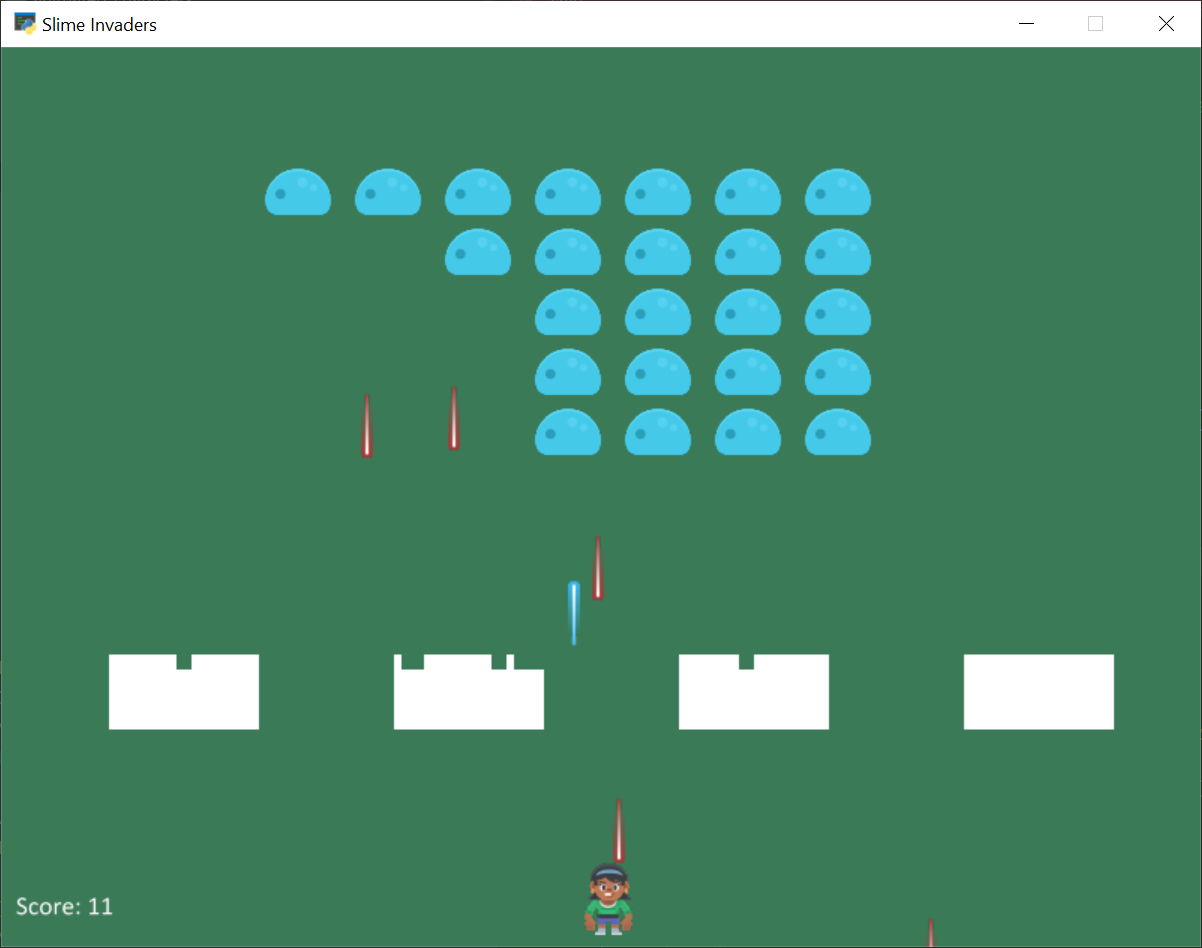
slime_invaders.py#
  1"""
  2Slime Invaders
  3
  4Artwork from https://kenney.nl
  5
  6This example shows how to:
  7
  8* Get sprites to move as a group
  9* Change texture of sprites as a group
 10* Only have the bottom sprite in the group fire lasers
 11* Create 'shields' like in space invaders
 12
 13If Python and Arcade are installed, this example can be run from the command line with:
 14python -m arcade.examples.slime_invaders
 15"""
 16import random
 17import arcade
 18
 19SPRITE_SCALING_PLAYER = 0.5
 20SPRITE_SCALING_enemy = 0.5
 21SPRITE_SCALING_LASER = 0.8
 22
 23SCREEN_WIDTH = 800
 24SCREEN_HEIGHT = 600
 25SCREEN_TITLE = "Slime Invaders"
 26
 27BULLET_SPEED = 5
 28ENEMY_SPEED = 2
 29
 30MAX_PLAYER_BULLETS = 3
 31
 32# This margin controls how close the enemy gets to the left or right side
 33# before reversing direction.
 34ENEMY_VERTICAL_MARGIN = 15
 35RIGHT_ENEMY_BORDER = SCREEN_WIDTH - ENEMY_VERTICAL_MARGIN
 36LEFT_ENEMY_BORDER = ENEMY_VERTICAL_MARGIN
 37
 38# How many pixels to move the enemy down when reversing
 39ENEMY_MOVE_DOWN_AMOUNT = 30
 40
 41# Game state
 42GAME_OVER = 1
 43PLAY_GAME = 0
 44
 45
 46class MyGame(arcade.Window):
 47    """ Main application class. """
 48
 49    def __init__(self):
 50        """ Initializer """
 51        # Call the parent class initializer
 52        super().__init__(SCREEN_WIDTH, SCREEN_HEIGHT, SCREEN_TITLE)
 53
 54        # Variables that will hold sprite lists
 55        self.player_list = None
 56        self.enemy_list = None
 57        self.player_bullet_list = None
 58        self.enemy_bullet_list = None
 59        self.shield_list = None
 60
 61        # Textures for the enemy
 62        self.enemy_textures = None
 63
 64        # State of the game
 65        self.game_state = PLAY_GAME
 66
 67        # Set up the player info
 68        self.player_sprite = None
 69        self.score = 0
 70
 71        # Enemy movement
 72        self.enemy_change_x = -ENEMY_SPEED
 73
 74        # Don't show the mouse cursor
 75        self.set_mouse_visible(False)
 76
 77        # Load sounds. Sounds from kenney.nl
 78        self.gun_sound = arcade.load_sound(":resources:sounds/hurt5.wav")
 79        self.hit_sound = arcade.load_sound(":resources:sounds/hit5.wav")
 80
 81        arcade.set_background_color(arcade.color.AMAZON)
 82
 83        # arcade.configure_logging()
 84
 85    def setup_level_one(self):
 86        # Load the textures for the enemies, one facing left, one right
 87        self.enemy_textures = []
 88        texture = arcade.load_texture(":resources:images/enemies/slimeBlue.png", flipped_horizontally=True)
 89        self.enemy_textures.append(texture)
 90        texture = arcade.load_texture(":resources:images/enemies/slimeBlue.png")
 91        self.enemy_textures.append(texture)
 92
 93        # Create rows and columns of enemies
 94        x_count = 7
 95        x_start = 380
 96        x_spacing = 60
 97        y_count = 5
 98        y_start = 420
 99        y_spacing = 40
100        for x in range(x_start, x_spacing * x_count + x_start, x_spacing):
101            for y in range(y_start, y_spacing * y_count + y_start, y_spacing):
102
103                # Create the enemy instance
104                # enemy image from kenney.nl
105                enemy = arcade.Sprite()
106                enemy.scale = SPRITE_SCALING_enemy
107                enemy.texture = self.enemy_textures[1]
108
109                # Position the enemy
110                enemy.center_x = x
111                enemy.center_y = y
112
113                # Add the enemy to the lists
114                self.enemy_list.append(enemy)
115
116    def make_shield(self, x_start):
117        """
118        Make a shield, which is just a 2D grid of solid color sprites
119        stuck together with no margin so you can't tell them apart.
120        """
121        shield_block_width = 5
122        shield_block_height = 10
123        shield_width_count = 20
124        shield_height_count = 5
125        y_start = 150
126        for x in range(x_start,
127                       x_start + shield_width_count * shield_block_width,
128                       shield_block_width):
129            for y in range(y_start,
130                           y_start + shield_height_count * shield_block_height,
131                           shield_block_height):
132                shield_sprite = arcade.SpriteSolidColor(shield_block_width,
133                                                        shield_block_height,
134                                                        arcade.color.WHITE)
135                shield_sprite.center_x = x
136                shield_sprite.center_y = y
137                self.shield_list.append(shield_sprite)
138
139    def setup(self):
140        """
141        Set up the game and initialize the variables.
142        Call this method if you implement a 'play again' feature.
143        """
144
145        self.game_state = PLAY_GAME
146
147        # Sprite lists
148        self.player_list = arcade.SpriteList()
149        self.enemy_list = arcade.SpriteList()
150        self.player_bullet_list = arcade.SpriteList()
151        self.enemy_bullet_list = arcade.SpriteList()
152        self.shield_list = arcade.SpriteList(is_static=True)
153
154        # Set up the player
155        self.score = 0
156
157        # Image from kenney.nl
158        self.player_sprite = arcade.Sprite(":resources:images/animated_characters/female_person/"
159                                           "femalePerson_idle.png", SPRITE_SCALING_PLAYER)
160        self.player_sprite.center_x = 50
161        self.player_sprite.center_y = 40
162        self.player_list.append(self.player_sprite)
163
164        # Make each of the shields
165        for x in range(75, 800, 190):
166            self.make_shield(x)
167
168        # Set the background color
169        arcade.set_background_color(arcade.color.AMAZON)
170
171        self.setup_level_one()
172
173    def on_draw(self):
174        """ Render the screen. """
175
176        # This command has to happen before we start drawing
177        self.clear()
178
179        # Draw all the sprites.
180        self.enemy_list.draw()
181        self.player_bullet_list.draw()
182        self.enemy_bullet_list.draw()
183        self.shield_list.draw()
184        self.player_list.draw()
185
186        # Render the text
187        arcade.draw_text(f"Score: {self.score}", 10, 20, arcade.color.WHITE, 14)
188
189        # Draw game over if the game state is such
190        if self.game_state == GAME_OVER:
191            arcade.draw_text("GAME OVER", 250, 300, arcade.color.WHITE, 55)
192            self.set_mouse_visible(True)
193
194    def on_mouse_motion(self, x, y, dx, dy):
195        """
196        Called whenever the mouse moves.
197        """
198
199        # Don't move the player if the game is over
200        if self.game_state == GAME_OVER:
201            return
202
203        self.player_sprite.center_x = x
204
205    def on_mouse_press(self, x, y, button, modifiers):
206        """
207        Called whenever the mouse button is clicked.
208        """
209
210        # Only allow the user so many bullets on screen at a time to prevent
211        # them from spamming bullets.
212        if len(self.player_bullet_list) < MAX_PLAYER_BULLETS:
213
214            # Gunshot sound
215            arcade.play_sound(self.gun_sound)
216
217            # Create a bullet
218            bullet = arcade.Sprite(":resources:images/space_shooter/laserBlue01.png", SPRITE_SCALING_LASER)
219
220            # The image points to the right, and we want it to point up. So
221            # rotate it.
222            bullet.angle = 90
223
224            # Give the bullet a speed
225            bullet.change_y = BULLET_SPEED
226
227            # Position the bullet
228            bullet.center_x = self.player_sprite.center_x
229            bullet.bottom = self.player_sprite.top
230
231            # Add the bullet to the appropriate lists
232            self.player_bullet_list.append(bullet)
233
234    def update_enemies(self):
235
236        # Move the enemy vertically
237        for enemy in self.enemy_list:
238            enemy.center_x += self.enemy_change_x
239
240        # Check every enemy to see if any hit the edge. If so, reverse the
241        # direction and flag to move down.
242        move_down = False
243        for enemy in self.enemy_list:
244            if enemy.right > RIGHT_ENEMY_BORDER and self.enemy_change_x > 0:
245                self.enemy_change_x *= -1
246                move_down = True
247            if enemy.left < LEFT_ENEMY_BORDER and self.enemy_change_x < 0:
248                self.enemy_change_x *= -1
249                move_down = True
250
251        # Did we hit the edge above, and need to move t he enemy down?
252        if move_down:
253            # Yes
254            for enemy in self.enemy_list:
255                # Move enemy down
256                enemy.center_y -= ENEMY_MOVE_DOWN_AMOUNT
257                # Flip texture on enemy so it faces the other way
258                if self.enemy_change_x > 0:
259                    enemy.texture = self.enemy_textures[0]
260                else:
261                    enemy.texture = self.enemy_textures[1]
262
263    def allow_enemies_to_fire(self):
264        """
265        See if any enemies will fire this frame.
266        """
267        # Track which x values have had a chance to fire a bullet.
268        # Since enemy list is build from the bottom up, we can use
269        # this to only allow the bottom row to fire.
270        x_spawn = []
271        for enemy in self.enemy_list:
272            # Adjust the chance depending on the number of enemies. Fewer
273            # enemies, more likely to fire.
274            chance = 4 + len(self.enemy_list) * 4
275
276            # Fire if we roll a zero, and no one else in this column has had
277            # a chance to fire.
278            if random.randrange(chance) == 0 and enemy.center_x not in x_spawn:
279                # Create a bullet
280                bullet = arcade.Sprite(":resources:images/space_shooter/laserRed01.png", SPRITE_SCALING_LASER)
281
282                # Angle down.
283                bullet.angle = 180
284
285                # Give the bullet a speed
286                bullet.change_y = -BULLET_SPEED
287
288                # Position the bullet so its top id right below the enemy
289                bullet.center_x = enemy.center_x
290                bullet.top = enemy.bottom
291
292                # Add the bullet to the appropriate list
293                self.enemy_bullet_list.append(bullet)
294
295            # Ok, this column has had a chance to fire. Add to list so we don't
296            # try it again this frame.
297            x_spawn.append(enemy.center_x)
298
299    def process_enemy_bullets(self):
300
301        # Move the bullets
302        self.enemy_bullet_list.update()
303
304        # Loop through each bullet
305        for bullet in self.enemy_bullet_list:
306            # Check this bullet to see if it hit a shield
307            hit_list = arcade.check_for_collision_with_list(bullet, self.shield_list)
308
309            # If it did, get rid of the bullet and shield blocks
310            if len(hit_list) > 0:
311                bullet.remove_from_sprite_lists()
312                for shield in hit_list:
313                    shield.remove_from_sprite_lists()
314                continue
315
316            # See if the player got hit with a bullet
317            if arcade.check_for_collision_with_list(self.player_sprite, self.enemy_bullet_list):
318                self.game_state = GAME_OVER
319
320            # If the bullet falls off the screen get rid of it
321            if bullet.top < 0:
322                bullet.remove_from_sprite_lists()
323
324    def process_player_bullets(self):
325
326        # Move the bullets
327        self.player_bullet_list.update()
328
329        # Loop through each bullet
330        for bullet in self.player_bullet_list:
331
332            # Check this bullet to see if it hit a enemy
333            hit_list = arcade.check_for_collision_with_list(bullet, self.shield_list)
334            # If it did, get rid of the bullet
335            if len(hit_list) > 0:
336                bullet.remove_from_sprite_lists()
337                for shield in hit_list:
338                    shield.remove_from_sprite_lists()
339                continue
340
341            # Check this bullet to see if it hit a enemy
342            hit_list = arcade.check_for_collision_with_list(bullet, self.enemy_list)
343
344            # If it did, get rid of the bullet
345            if len(hit_list) > 0:
346                bullet.remove_from_sprite_lists()
347
348            # For every enemy we hit, add to the score and remove the enemy
349            for enemy in hit_list:
350                enemy.remove_from_sprite_lists()
351                self.score += 1
352
353                # Hit Sound
354                arcade.play_sound(self.hit_sound)
355
356            # If the bullet flies off-screen, remove it.
357            if bullet.bottom > SCREEN_HEIGHT:
358                bullet.remove_from_sprite_lists()
359
360    def on_update(self, delta_time):
361        """ Movement and game logic """
362
363        if self.game_state == GAME_OVER:
364            return
365
366        self.update_enemies()
367        self.allow_enemies_to_fire()
368        self.process_enemy_bullets()
369        self.process_player_bullets()
370
371        if len(self.enemy_list) == 0:
372            self.setup_level_one()
373
374
375def main():
376    window = MyGame()
377    window.setup()
378    arcade.run()
379
380
381if __name__ == "__main__":
382    main()