Procedural Caves - Cellular Automata#
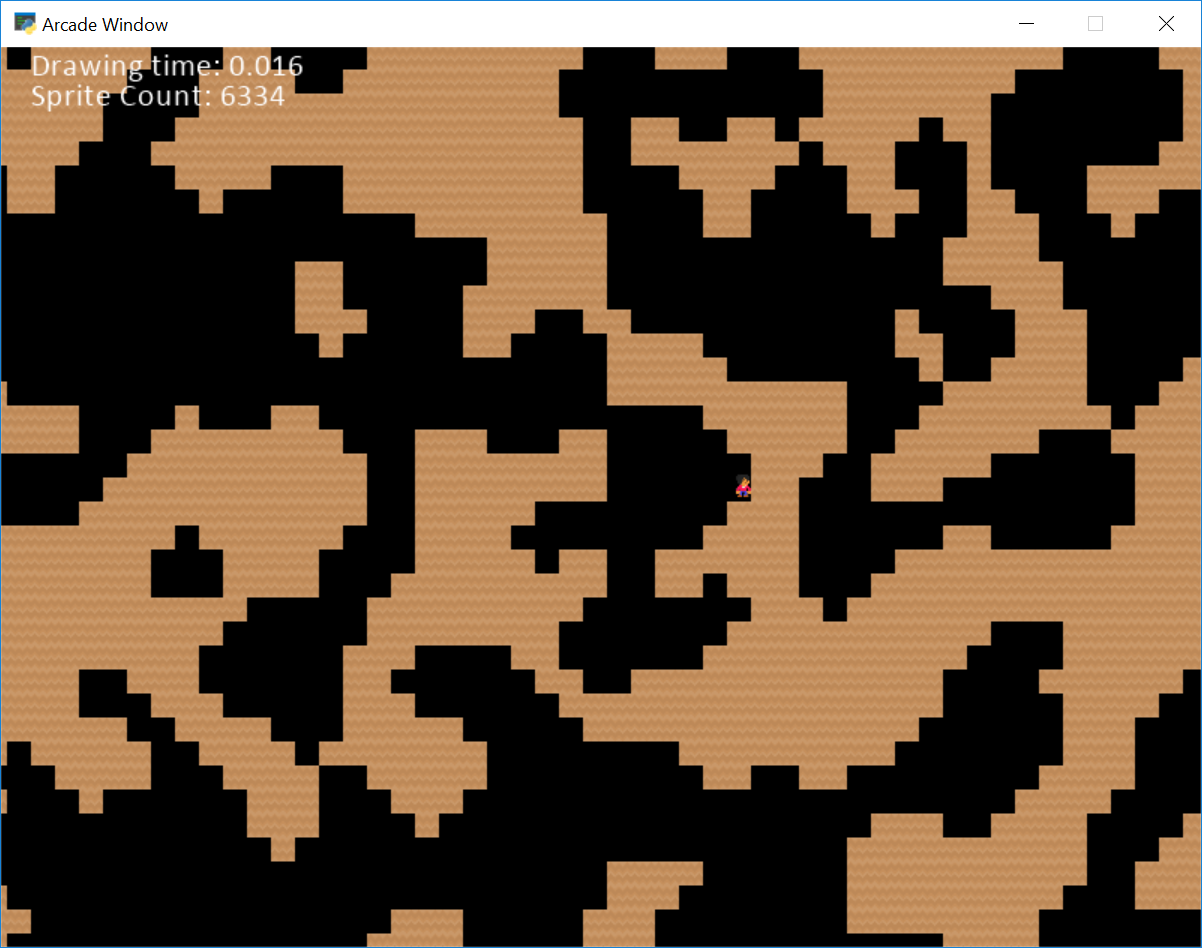
procedural_caves_cellular.py#
  1"""
  2This example procedurally develops a random cave based on cellular automata.
  3
  4For more information, see:
  5https://gamedevelopment.tutsplus.com/tutorials/generate-random-cave-levels-using-cellular-automata--gamedev-9664
  6
  7If Python and Arcade are installed, this example can be run from the command line with:
  8python -m arcade.examples.procedural_caves_cellular
  9"""
 10
 11import random
 12import arcade
 13import timeit
 14from pyglet.math import Vec2
 15
 16# Sprite scaling. Make this larger, like 0.5 to zoom in and add
 17# 'mystery' to what you can see. Make it smaller, like 0.1 to see
 18# more of the map.
 19SPRITE_SCALING = 0.25
 20SPRITE_SIZE = 128 * SPRITE_SCALING
 21
 22# How big the grid is
 23GRID_WIDTH = 450
 24GRID_HEIGHT = 400
 25
 26# Parameters for cellular automata
 27CHANCE_TO_START_ALIVE = 0.4
 28DEATH_LIMIT = 3
 29BIRTH_LIMIT = 4
 30NUMBER_OF_STEPS = 4
 31
 32# How fast the player moves
 33MOVEMENT_SPEED = 5
 34
 35# How close the player can get to the edge before we scroll.
 36VIEWPORT_MARGIN = 300
 37
 38# How big the window is
 39WINDOW_WIDTH = 800
 40WINDOW_HEIGHT = 600
 41WINDOW_TITLE = "Procedural Caves Cellular Automata Example"
 42
 43# How fast the camera pans to the player. 1.0 is instant.
 44CAMERA_SPEED = 0.1
 45
 46
 47def create_grid(width, height):
 48    """ Create a two-dimensional grid of specified size. """
 49    return [[0 for _x in range(width)] for _y in range(height)]
 50
 51
 52def initialize_grid(grid):
 53    """ Randomly set grid locations to on/off based on chance. """
 54    height = len(grid)
 55    width = len(grid[0])
 56    for row in range(height):
 57        for column in range(width):
 58            if random.random() <= CHANCE_TO_START_ALIVE:
 59                grid[row][column] = 1
 60
 61
 62def count_alive_neighbors(grid, x, y):
 63    """ Count neighbors that are alive. """
 64    height = len(grid)
 65    width = len(grid[0])
 66    alive_count = 0
 67    for i in range(-1, 2):
 68        for j in range(-1, 2):
 69            neighbor_x = x + i
 70            neighbor_y = y + j
 71            if i == 0 and j == 0:
 72                continue
 73            elif neighbor_x < 0 or neighbor_y < 0 or neighbor_y >= height or neighbor_x >= width:
 74                # Edges are considered alive. Makes map more likely to appear naturally closed.
 75                alive_count += 1
 76            elif grid[neighbor_y][neighbor_x] == 1:
 77                alive_count += 1
 78    return alive_count
 79
 80
 81def do_simulation_step(old_grid):
 82    """ Run a step of the cellular automaton. """
 83    height = len(old_grid)
 84    width = len(old_grid[0])
 85    new_grid = create_grid(width, height)
 86    for x in range(width):
 87        for y in range(height):
 88            alive_neighbors = count_alive_neighbors(old_grid, x, y)
 89            if old_grid[y][x] == 1:
 90                if alive_neighbors < DEATH_LIMIT:
 91                    new_grid[y][x] = 0
 92                else:
 93                    new_grid[y][x] = 1
 94            else:
 95                if alive_neighbors > BIRTH_LIMIT:
 96                    new_grid[y][x] = 1
 97                else:
 98                    new_grid[y][x] = 0
 99    return new_grid
100
101
102class InstructionView(arcade.View):
103    """ View to show instructions """
104
105    def __init__(self):
106        super().__init__()
107        self.frame_count = 0
108
109    def on_show_view(self):
110        """ This is run once when we switch to this view """
111        arcade.set_background_color(arcade.csscolor.DARK_SLATE_BLUE)
112
113        # Reset the viewport, necessary if we have a scrolling game and we need
114        # to reset the viewport back to the start so we can see what we draw.
115        arcade.set_viewport(0, self.window.width, 0, self.window.height)
116
117    def on_draw(self):
118        """ Draw this view """
119        self.clear()
120        arcade.draw_text("Loading...", self.window.width / 2, self.window.height / 2,
121                         arcade.color.BLACK, font_size=50, anchor_x="center")
122
123    def on_update(self, dt):
124        if self.frame_count == 0:
125            self.frame_count += 1
126            return
127
128        """ If the user presses the mouse button, start the game. """
129        game_view = GameView()
130        game_view.setup()
131        self.window.show_view(game_view)
132
133
134class GameView(arcade.View):
135    """
136    Main application class.
137    """
138
139    def __init__(self):
140        super().__init__()
141
142        self.grid = None
143        self.wall_list = None
144        self.player_list = None
145        self.player_sprite = None
146        self.draw_time = 0
147        self.processing_time = 0
148        self.physics_engine = None
149
150        # Track the current state of what key is pressed
151        self.left_pressed = False
152        self.right_pressed = False
153        self.up_pressed = False
154        self.down_pressed = False
155
156        # Create the cameras. One for the GUI, one for the sprites.
157        # We scroll the 'sprite world' but not the GUI.
158        self.camera_sprites = arcade.SimpleCamera()
159        self.camera_gui = arcade.SimpleCamera()
160
161        arcade.set_background_color(arcade.color.BLACK)
162
163        self.sprite_count_text = None
164        self.draw_time_text = None
165        self.processing_time_text = None
166
167    def setup(self):
168        self.wall_list = arcade.SpriteList(use_spatial_hash=True)
169        self.player_list = arcade.SpriteList()
170
171        # Create cave system using a 2D grid
172        self.grid = create_grid(GRID_WIDTH, GRID_HEIGHT)
173        initialize_grid(self.grid)
174        for step in range(NUMBER_OF_STEPS):
175            self.grid = do_simulation_step(self.grid)
176
177        # Create sprites based on 2D grid
178        # Each grid location is a sprite.
179        for row in range(GRID_HEIGHT):
180            for column in range(GRID_WIDTH):
181                if self.grid[row][column] == 1:
182                    wall = arcade.Sprite(":resources:images/tiles/grassCenter.png", SPRITE_SCALING)
183                    wall.center_x = column * SPRITE_SIZE + SPRITE_SIZE / 2
184                    wall.center_y = row * SPRITE_SIZE + SPRITE_SIZE / 2
185                    self.wall_list.append(wall)
186
187        # Set up the player
188        self.player_sprite = arcade.Sprite(":resources:images/animated_characters/female_person/"
189                                           "femalePerson_idle.png",
190                                           SPRITE_SCALING)
191        self.player_list.append(self.player_sprite)
192
193        # Randomly place the player. If we are in a wall, repeat until we aren't.
194        placed = False
195        while not placed:
196
197            # Randomly position
198            max_x = int(GRID_WIDTH * SPRITE_SIZE)
199            max_y = int(GRID_HEIGHT * SPRITE_SIZE)
200            self.player_sprite.center_x = random.randrange(max_x)
201            self.player_sprite.center_y = random.randrange(max_y)
202
203            # Are we in a wall?
204            walls_hit = arcade.check_for_collision_with_list(self.player_sprite, self.wall_list)
205            if len(walls_hit) == 0:
206                # Not in a wall! Success!
207                placed = True
208
209        self.scroll_to_player(1.0)
210
211        self.physics_engine = arcade.PhysicsEngineSimple(self.player_sprite,
212                                                         self.wall_list)
213
214        # Draw info on the screen
215        sprite_count = len(self.wall_list)
216        output = f"Sprite Count: {sprite_count:,}"
217        self.sprite_count_text = arcade.Text(output,
218                                             20,
219                                             self.window.height - 20,
220                                             arcade.color.WHITE, 16)
221
222        output = "Drawing time:"
223        self.draw_time_text = arcade.Text(output,
224                                          20,
225                                          self.window.height - 40,
226                                          arcade.color.WHITE, 16)
227
228        output = "Processing time:"
229        self.processing_time_text = arcade.Text(output,
230                                                20,
231                                                self.window.height - 60,
232                                                arcade.color.WHITE, 16)
233
234    def on_draw(self):
235        """ Render the screen. """
236
237        # Start timing how long this takes
238        draw_start_time = timeit.default_timer()
239
240        # This command should happen before we start drawing. It will clear
241        # the screen to the background color, and erase what we drew last frame.
242        self.clear()
243
244        # Select the camera we'll use to draw all our sprites
245        self.camera_sprites.use()
246
247        # Draw the sprites
248        self.wall_list.draw()
249        self.player_list.draw()
250
251        # Select the (unscrolled) camera for our GUI
252        self.camera_gui.use()
253
254        self.sprite_count_text.draw()
255        output = f"Drawing time: {self.draw_time:.3f}"
256        self.draw_time_text.text = output
257        self.draw_time_text.draw()
258
259        output = f"Processing time: {self.processing_time:.3f}"
260        self.processing_time_text.text = output
261        self.processing_time_text.draw()
262
263        self.draw_time = timeit.default_timer() - draw_start_time
264
265    def update_player_speed(self):
266
267        # Calculate speed based on the keys pressed
268        self.player_sprite.change_x = 0
269        self.player_sprite.change_y = 0
270
271        if self.up_pressed and not self.down_pressed:
272            self.player_sprite.change_y = MOVEMENT_SPEED
273        elif self.down_pressed and not self.up_pressed:
274            self.player_sprite.change_y = -MOVEMENT_SPEED
275        if self.left_pressed and not self.right_pressed:
276            self.player_sprite.change_x = -MOVEMENT_SPEED
277        elif self.right_pressed and not self.left_pressed:
278            self.player_sprite.change_x = MOVEMENT_SPEED
279
280    def on_key_press(self, key, modifiers):
281        """Called whenever a key is pressed. """
282
283        if key == arcade.key.UP:
284            self.up_pressed = True
285        elif key == arcade.key.DOWN:
286            self.down_pressed = True
287        elif key == arcade.key.LEFT:
288            self.left_pressed = True
289        elif key == arcade.key.RIGHT:
290            self.right_pressed = True
291
292    def on_key_release(self, key, modifiers):
293        """Called when the user releases a key. """
294
295        if key == arcade.key.UP:
296            self.up_pressed = False
297        elif key == arcade.key.DOWN:
298            self.down_pressed = False
299        elif key == arcade.key.LEFT:
300            self.left_pressed = False
301        elif key == arcade.key.RIGHT:
302            self.right_pressed = False
303
304    def scroll_to_player(self, speed=CAMERA_SPEED):
305        """
306        Scroll the window to the player.
307
308        if CAMERA_SPEED is 1, the camera will immediately move to the desired position.
309        Anything between 0 and 1 will have the camera move to the location with a smoother
310        pan.
311        """
312
313        position = Vec2(self.player_sprite.center_x - self.window.width / 2,
314                        self.player_sprite.center_y - self.window.height / 2)
315        self.camera_sprites.move_to(position, speed)
316        self.camera_sprites.update()
317
318    def on_resize(self, width: int, height: int):
319        """
320        Resize window
321        Handle the user grabbing the edge and resizing the window.
322        """
323        self.camera_sprites.resize(width, height)
324        self.camera_gui.resize(width, height)
325
326    def on_update(self, delta_time):
327        """ Movement and game logic """
328
329        start_time = timeit.default_timer()
330
331        # Call update on all sprites (The sprites don't do much in this
332        # example though.)
333        self.update_player_speed()
334        self.physics_engine.update()
335
336        # Scroll the screen to the player
337        self.scroll_to_player()
338
339        # Save the time it took to do this.
340        self.processing_time = timeit.default_timer() - start_time
341
342
343def main():
344    window = arcade.Window(WINDOW_WIDTH, WINDOW_HEIGHT, WINDOW_TITLE, resizable=True)
345    start_view = InstructionView()
346    window.show_view(start_view)
347    arcade.run()
348
349
350if __name__ == "__main__":
351    main()